Google Ads for Small Business in India: Complete Beginner's Guide 2026
Start advertising on Google. Campaign setup, keyword research, budgeting, and optimization tips for Indian small businesses.

Introduction
"Google Ads pe paise barbaad ho gaye, kuch nahi mila."
I've heard this from dozens of small business owners. They tried Google Ads, burned ₹50,000 in two months, got some clicks but zero customers, and concluded "Google Ads doesn't work."
But here's the thing: Google Ads absolutely works. It drives ₹8 for every ₹1 spent on average. The problem isn't Google Ads — it's how people use it.
Running Google Ads without strategy is like driving with your eyes closed. You'll move forward but probably crash. Most small businesses make the same predictable mistakes: wrong keywords, poor ad copy, no conversion tracking, terrible landing pages.
This guide will save you from those mistakes. I'll show you exactly how to set up Google Ads campaigns that actually generate customers, not just clicks. Whether you're spending ₹10,000 or ₹1,00,000 per month, these principles apply.
Let's turn Google Ads into your most profitable marketing channel.
Understanding Google Ads Basics
What is Google Ads?
Google Ads (formerly AdWords) lets you pay to appear in Google search results when people search for specific keywords.
Example: You own a bakery in Pune. Someone searches "birthday cake Pune." Your ad appears at the top. They click, visit your site, place an order. You just got a customer.
How Pricing Works
Google Ads uses Pay-Per-Click (PPC) model:
- You only pay when someone clicks your ad
- Cost per click varies by keyword competition
- You set maximum daily budget
- You bid on keywords (auction system)
Typical costs in India (2026):
- Low competition: ₹5-20 per click
- Medium competition: ₹20-80 per click
- High competition: ₹80-500+ per click
Keywords like "insurance," "lawyer," "MBA" cost more. "Handmade soap" or "pet grooming Jaipur" cost less.
Types of Google Ads Campaigns
| Campaign Type | Best For | Typical CPC |
|---|---|---|
| Search Ads | Active buyers searching | ₹10-100 |
| Display Ads | Brand awareness, retargeting | ₹2-20 |
| Shopping Ads | E-commerce products | ₹8-50 |
| Video Ads (YouTube) | Video content, engagement | ₹3-15 |
| Performance Max | All platforms, automated | Varies |
| Local Services | Service businesses (plumber, etc.) | Pay per lead |
For most small businesses starting out: Search Ads are the best ROI.
Minimum ₹10,000/month to see meaningful results. Less than that, and you won't get enough data to optimize. If budget is tight, start with highly specific long-tail keywords.
Setting Up Your First Campaign
Step 1: Create Google Ads Account
- Go to ads.google.com
- Sign in with Google account
- Enter business info (name, website, location)
- Set up billing (credit/debit card)
- Verify website ownership (optional but recommended)
Step 2: Define Your Goal
What do you want?
- Website traffic?
- Phone calls?
- Form submissions?
- Product purchases?
- Store visits?
Be specific. "Get customers" is vague. "Get 20 phone calls from people wanting birthday cakes" is clear.
Step 3: Keyword Research
This is where most people mess up. Keywords determine who sees your ads.
Use Google Keyword Planner:
- Tools → Keyword Planner
- Enter your product/service
- Filter by location (India or specific cities)
- Look for keywords with commercial intent
Keyword intent types:
- Informational: "how to bake cake" (not ready to buy)
- Commercial: "best bakery pune" (researching)
- Transactional: "order birthday cake pune" (ready to buy)
Focus on commercial and transactional keywords.
Step 4: Structure Your Campaign
Good campaign structure:
Campaign: Bakery - Pune
  ├── Ad Group: Birthday Cakes
  │   ├── Keywords: birthday cake pune, birthday cake delivery pune
  │   └── Ads: 3-4 variations
  ├── Ad Group: Wedding Cakes
  │   ├── Keywords: wedding cake pune, custom wedding cake
  │   └── Ads: 3-4 variations
  └── Ad Group: Cupcakes
      ├── Keywords: cupcakes pune, custom cupcakes
      └── Ads: 3-4 variations
Each ad group = one specific product/service with tightly related keywords.
Step 5: Write Your First Ad
Search ad structure:
- Headline 1: Include keyword (30 chars)
- Headline 2: Benefit/offer (30 chars)
- Headline 3: Call-to-action (30 chars)
- Description 1: More details (90 chars)
- Description 2: Trust signals (90 chars)
Example:
Headline 1: Birthday Cakes in Pune
Headline 2: Same Day Delivery Available
Headline 3: Order Online - 20% Off

Description 1: Fresh, custom birthday cakes delivered to your doorstep. Choose from 50+ designs. Order before 2 PM for same-day delivery.

Description 2: 1000+ Happy Customers. 4.8★ Rating. Safe Payment. Free Delivery Above ₹500.
Step 6: Set Budget and Bids
Daily budget calculation:
- Monthly budget: ₹20,000
- Daily budget: ₹20,000 ÷ 30 = ₹666
Google might spend up to 2x daily budget on high-traffic days, but monthly total won't exceed monthly budget.
Bidding strategy for beginners:
- Start with "Maximize Clicks"
- Once you have conversion tracking: Switch to "Maximize Conversions"
- Advanced: Use Target CPA or Target ROAS
Keyword Match Types Explained
How you enter keywords determines when ads show:
| Match Type | Syntax | Shows For | Control |
|---|---|---|---|
| Broad Match | birthday cake | cake, birthday party, bakery near me | Low |
| Phrase Match | "birthday cake" | buy birthday cake, chocolate birthday cake | Medium |
| Exact Match | [birthday cake] | birthday cake (and close variants) | High |
Recommendation for beginners:
- Start with Phrase Match:
"keyword" - Add Exact Match for your best keywords:
[keyword] - Avoid Broad Match initially (wastes money)
Negative Keywords (Critical!)
Tell Google when NOT to show your ads:
If you sell premium cakes, add negative keywords:
- -free
- -cheap
- -job
- -recipe
- -how to make
- -diy
This prevents clicks from people who will never buy.
80% of your conversions will come from 20% of your keywords. After one month, identify the top 20% and allocate more budget there. Pause or reduce the rest.
Ad Extensions: Free Real Estate
Extensions make your ads bigger and more clickable at no extra cost.
Essential Extensions
1. Sitelink Extensions
- Add links to specific pages
- Example: "View Menu," "Order Now," "Contact Us"
2. Callout Extensions
- Short text highlights
- Example: "Free Delivery," "Same Day," "No Minimum Order"
3. Call Extensions
- Phone number in ad
- Especially important for mobile
- Can track calls as conversions
4. Location Extensions
- Show your address
- Link to Google Maps
- Essential for local businesses
5. Price Extensions
- Show product prices directly
- Pre-qualifies customers
- Great for transparency
Use all relevant extensions. They improve Click-Through Rate (CTR) by 10-15%.
Conversion Tracking: The Most Important Step
If you're not tracking conversions, you're flying blind. You won't know which keywords or ads actually bring customers.
What to Track
- Form submissions
- Phone calls
- Purchases (e-commerce)
- Chat conversations
- App downloads
How to Set Up Conversion Tracking
- Go to Tools → Conversions
- Click "+" to create new conversion action
- Choose type (Website, Phone calls, App, Import)
- Follow setup wizard
- Install tracking code on website (or use Google Tag Manager)
- Test to ensure it's working
For phone calls, use Google's call forwarding number to track calls from ads.
Landing Page Optimization
You can have perfect ads, but if your landing page sucks, you lose money.
Landing Page Must-Haves
- Match ad promise: Ad says "20% off"? Page should show 20% off immediately
- Clear headline: Reinforce what they clicked for
- One clear CTA: "Order Now" or "Call Now" — not both
- Mobile optimized: 70%+ of traffic is mobile
- Fast loading: Under 3 seconds or people bounce
- Trust signals: Reviews, ratings, security badges
- Easy contact: Phone number visible, click-to-call button
For detailed landing page optimization, read our Landing Page Design Guide.
Campaign Optimization
Week 1-2: Let It Learn
Don't make changes immediately. Google's algorithm needs data to optimize. Let campaign run for at least 1-2 weeks before major changes.
Week 3-4: Start Optimizing
Check these metrics:
- Impressions: How many times ads shown
- Clicks: How many people clicked
- CTR (Click-Through Rate): Clicks ÷ Impressions (aim for 3%+)
- CPC (Cost Per Click): Average cost per click
- Conversions: How many took desired action
- Cost Per Conversion: How much you pay per customer
Optimization actions:
- Search Terms Report: See what people actually searched
- Add good performers as keywords
- Add irrelevant searches as negative keywords
- Pause Poor Performers:
- Keywords with high CPC but no conversions
- Ads with low CTR
- Ad groups spending money without results
- Increase Bids on Winners:
- Keywords bringing conversions
- High CTR ads
- Profitable ad groups
- Test Ad Variations:
- Always have 3-4 ads per ad group
- Google auto-rotates and learns which performs best
- Regularly add new ad variations
Quality Score: The Secret Weapon
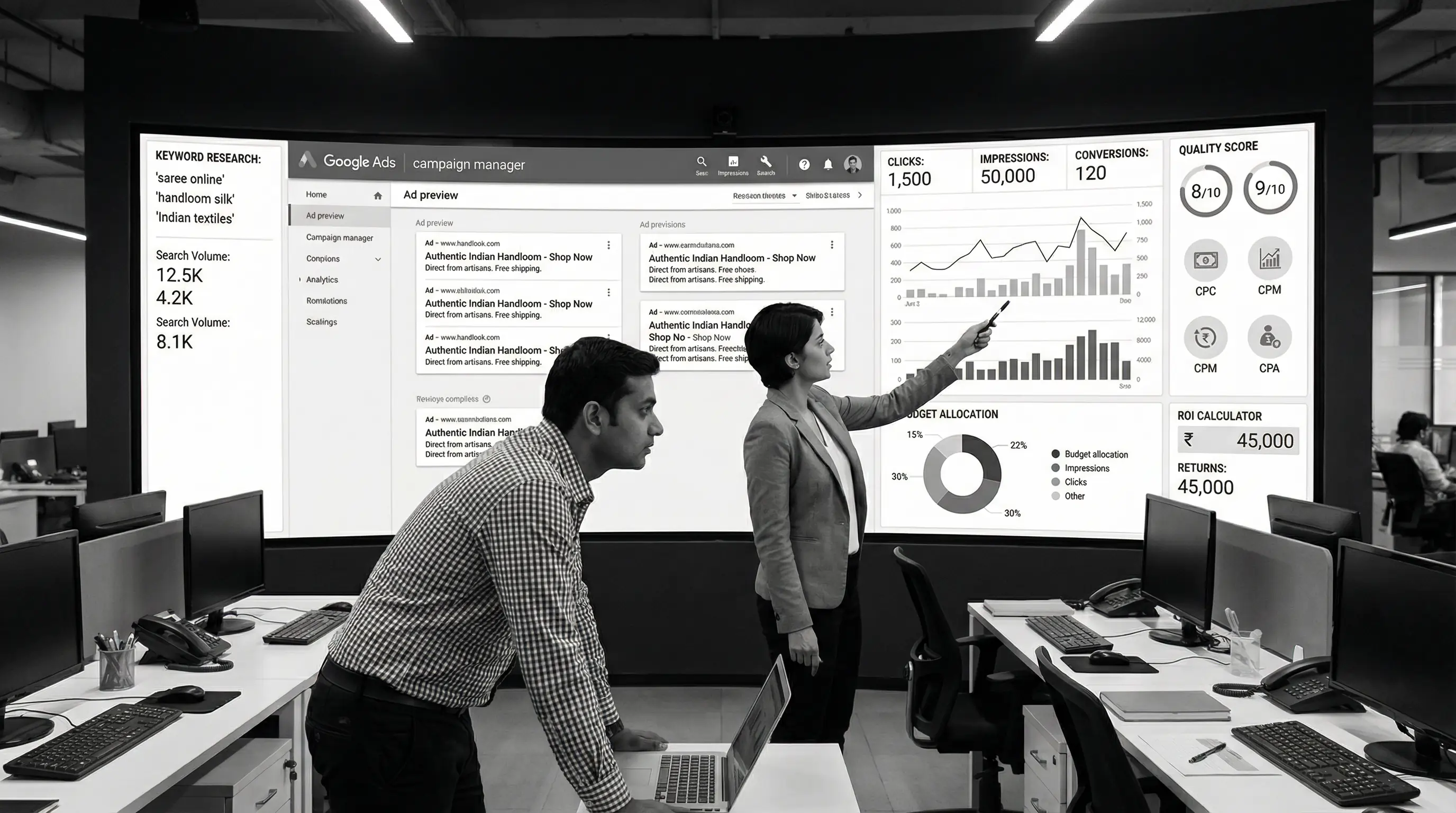
Quality Score (1-10) determines your ad rank and CPC. Higher Quality Score = Lower costs and better positions.
Quality Score factors:
- Expected CTR: Will people click your ad?
- Ad relevance: Does ad match keyword?
- Landing page experience: Is page relevant and fast?
How to improve:
- Include keyword in ad headline
- Match ad copy to landing page
- Improve landing page speed
- Use ad extensions
- Maintain high CTR
Budget Optimization
Starting Budget Guidelines
| Business Type | Starting Budget | Timeline to Results |
|---|---|---|
| Local Services | ₹10,000-20,000/month | 2-4 weeks |
| E-commerce | ₹25,000-50,000/month | 4-8 weeks |
| B2B Services | ₹30,000-75,000/month | 6-12 weeks |
| High Ticket Items | ₹50,000-2,00,000/month | 8-16 weeks |
Calculating ROI
Example:
- Google Ads spend: ₹30,000/month
- Conversions: 15 customers
- Average order value: ₹5,000
- Total revenue: ₹75,000
- Profit margin: 40% = ₹30,000 profit
- ROI: (₹30,000 - ₹30,000) ÷ ₹30,000 = 0% (break-even)
First month often breaks even or loses money. By month 3-4, with optimization, most campaigns become profitable.
When to Increase Budget
Increase budget when:
- You're profitable at current spend
- Campaign is limited by budget (search impression share < 50%)
- Cost per conversion is acceptable
- You can handle more customers
Google might suggest "increasing budget for better performance." Often this just means you'll spend more with same results. Only increase if you're hitting budget caps AND conversions are profitable.
Common Mistakes (And How to Avoid Them)
1. Wrong Keywords
Mistake: Targeting broad, informational keywords
Example: "cake recipe" (informational, no buying intent)
Fix: Target transactional keywords like "buy cake online pune"
2. Sending All Traffic to Homepage
Mistake: All ads point to homepage
Fix: Create specific landing pages matching ad intent
3. Not Using Negative Keywords
Mistake: Ads show for irrelevant searches
Fix: Build negative keyword list from day one
4. Ignoring Mobile
Mistake: Desktop-only optimization
Fix: Mobile-first approach, check mobile landing page
5. Setting and Forgetting
Mistake: Launch campaign, never check again
Fix: Weekly optimization for first 2 months, then bi-weekly
6. No Conversion Tracking
Mistake: Can't tell which keywords bring customers
Fix: Set up conversion tracking before spending ₹1
7. Competing with Yourself
Mistake: Multiple campaigns targeting same keywords
Fix: Consolidate into one well-structured campaign
8. Ignoring Search Terms Report
Mistake: Never check what people actually search
Fix: Weekly review, add negatives, add good terms as keywords
Advanced Strategies
Remarketing
Show ads to people who visited your website but didn't convert.
- Much cheaper (₹5-15 per click vs ₹20-100)
- Higher conversion rate (they already know you)
- Can offer special discounts to bring them back
Competitor Targeting
Bid on competitor brand names (if allowed in your industry).
Example: Competitor is "ABC Bakery" — you bid on "ABC Bakery" and show your ad.
Controversial but effective. Check legal implications first.
Dayparting
Run ads only during profitable hours.
Example: Restaurant gets most orders 5 PM - 10 PM. Increase bids during those hours, reduce or pause overnight.
Geographic Targeting
Not just cities — target specific neighborhoods.
If you deliver only to certain areas, exclude the rest. Don't pay for clicks from people you can't serve.
- Start with Search Ads — best ROI for beginners
- Minimum ₹10,000/month to see meaningful results
- Target transactional keywords — people ready to buy
- Use phrase and exact match — avoid broad match waste
- Negative keywords are critical — block irrelevant searches
- Conversion tracking is mandatory — can't optimize blind
- Landing page must match ad — keep promises
- Quality Score reduces costs — optimize for 7+ score
- Weekly optimization essential — campaigns aren't set-and-forget
- Give it 2-3 months — profitability takes time and data
Google Ads Checklist
Before launching:
Setup:
- ☐ Conversion tracking installed and tested
- ☐ Negative keywords list prepared
- ☐ Landing pages mobile-optimized
- ☐ All ad extensions added
- ☐ Budget set appropriately
Campaign Structure:
- ☐ Tight keyword groups (5-15 keywords per ad group)
- ☐ 3-4 ad variations per ad group
- ☐ Keywords in phrase or exact match
- ☐ Geographic targeting set correctly
Ongoing (Weekly):
- ☐ Review search terms report
- ☐ Add negative keywords
- ☐ Pause poor performers
- ☐ Check conversion costs
- ☐ Test new ad variations
Conclusion
Google Ads isn't about spending money and hoping for the best. It's a systematic process: test, measure, optimize, scale.
Most businesses fail at Google Ads because they skip the fundamentals. They target wrong keywords, send traffic to poor landing pages, don't track conversions, and quit before campaigns have time to optimize.
Follow this guide, give it time (at least 2-3 months), and you'll likely see positive ROI. Start small, learn what works, then scale aggressively on winning campaigns.
Google Ads works. The question is: are you willing to do it right?
Now go create your first campaign. Your future customers are searching right now.
Need help with Google Ads?
At Arcenik Technologies, we manage Google Ads campaigns for businesses across India. From setup to optimization to scaling, we handle everything while you focus on serving customers.
Related reading: Digital Marketing for Small Businesses in India: Complete Guide 2026 · Digital Marketing Cost in India 2026: Complete Pricing Guide · our Google Ads management services
Get a free Google Ads audit — we'll analyze your current campaigns (or competitors) and show you exactly how to improve results.